dbd AI Video Editor — Portfolio Project by Muhammad Daffa Ashdaqfillah
dbd is an AI-assisted video editor prototype that turns local phone footage, music, and a story prompt into beat-synced vertical highlights.
Published on July 7, 2026
Project Details
Description
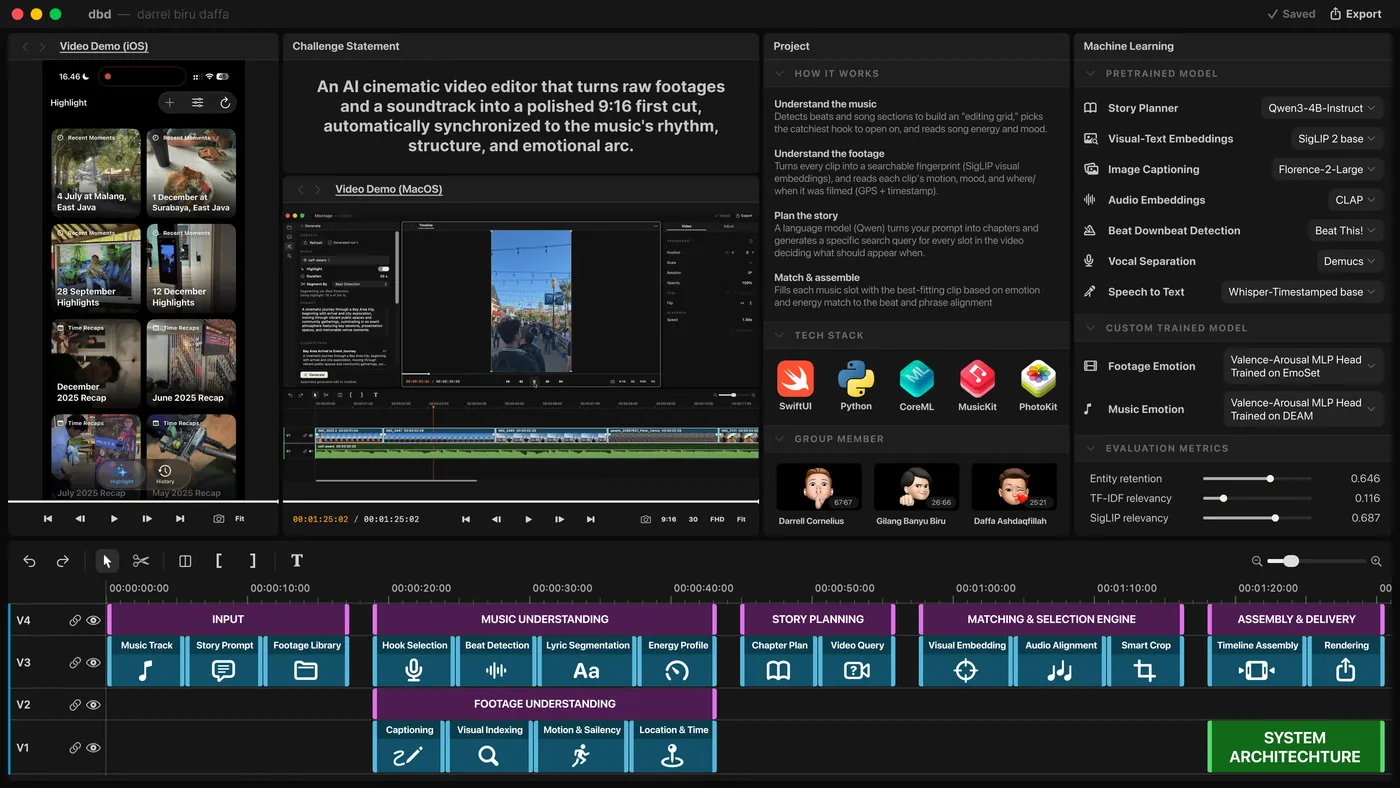
dbd is an AI-assisted cinematic video editor prototype that converts local phone footage, a music track, and a story prompt into a vertical highlight video. The project explores a multimodal editing workflow: analyze music timing, understand candidate footage, generate a story-aware plan, match shots to beat-aligned slots, and render a validated 1080x1920 edit.
The repository combines research notebooks, a Python proof-of-concept pipeline, an iOS SwiftUI prototype, a local FastAPI planning service, a React timeline review tool, and data collection utilities. The main product direction is an on-device or local-first highlight generator that keeps raw Photos media local while using compact summaries, embeddings, and structured plans to guide automatic editing.
Problem
Manual short-form video editing is slow because the editor has to listen for beat points, scan many clips, find usable visual moments, preserve story order, and align the final timeline to music. Simple auto-cut tools can cut on beats, but they usually do not understand whether a clip matches the requested story, whether a shot has already been reused, or whether the generated edit has valid frame and audio timing.
This project was built to test a more structured approach: treat the music and footage as two timelines with machine-readable features, then create an edit plan that can be inspected, constrained, and rendered deterministically.
Role
The codebase reflects an end-to-end solo prototype spanning research, model integration, mobile app development, local backend design, data tooling, and output validation. Work included planning the MIR and multimodal architecture, building the Python pipeline, implementing the SwiftUI iOS app, preparing Core ML model resources, integrating Apple Music and Photos workflows, and creating utilities for collecting and reviewing test media.
Solution
Beat Scene separates the problem into five layers: music analysis, footage indexing, planning, matching, and rendering. In the Python PoC, BeatThis detects beats and downbeats, Librosa derives transparent section and energy heuristics, Qwen generates story chapters and retrieval queries, CLAP scores audio cues, SigLIP matches text queries to sampled video frames, and FFmpeg renders the final vertical video.
In the iOS prototype, the same product idea is adapted for local generation. SwiftUI presents memory candidates from the Photos library, MusicKit searches and downloads Apple Music previews, BeatThis runs through Core ML, SigLIP Palmier indexes sampled video shots, an MLC-packaged language model creates slot-aware plans, and AVFoundation renders the preview while preserving a project history.
mermaidflowchart TD
  A[Photos Videos] --> B[Shot Sampling and SigLIP Embeddings]
  C[Music Track] --> D[BeatThis Beat and Downbeat Analysis]
  E[User Prompt] --> F[LLM Story and Slot Planning]
  D --> G[Beat-Aligned Editing Slots]
  F --> G
  B --> H[Text-to-Visual Shot Matching]
  G --> H
  H --> I[Frame-Quantized Timeline]
  I --> J[FFmpeg or AVFoundation Render]
  J --> K[Validated Vertical Highlight]
Key Features
- Local Photos scanning and memory discovery based on video metadata, date ranges, coarse place labels, favorites, duration, and candidate sections such as recent moments, place highlights, trips, and recaps.
- Apple Music preview search and download flow, with suggested queries based on memory context.
- BeatThis-based music analysis that produces beats, downbeats, BPM estimates, energy-aware editing slots, and fallback beat grids when model inference fails.
- SigLIP visual matching that samples video frames, detects rough shot changes through luma differences, embeds frames and text queries, and ranks candidate clips for each slot.
- LLM planning with strict JSON contracts, validation, retry logic, prompt-derived visual constraints, and sanitization to keep generated plans usable for retrieval.
- Timeline selection with explicit penalties for repeated source ranges, adjacent asset reuse, visual repetition, short clips, and missing exact query matches.
- Deterministic render validation in the Python pipeline, including frame count, duration, audio duration, dimensions, audio stream count, and 1080x1920 output checks.
- A React/Vite audio segmentation review interface for loading analysis JSON, inspecting labeled song sections, scrubbing audio, and testing timeline visualization.
- A Pexels footage collector for creating licensed test corpora with SQLite duplicate tracking, category rotation, orientation filtering, duration limits, and rate-limit handling.
Implementation
The Python PoC is organized around artifact-producing stages. It writes JSON, CSV, embedding matrices, sampled frames, FFmpeg filter graphs, render reports, and final videos into artifacts/full_flow_poc. Configuration controls the run ID, footage globs, music path, Palmier SigLIP model source, Qwen and CLAP model IDs, matching penalties, output resolution, FPS, and CRF.
The music stage can first create an audio highlight by choosing the most compelling fixed-length window. Its hook mode combines window energy with spectral recurrence so the editor can build around the most repeated, high-energy portion of a song rather than blindly starting at zero.
The matching stage quantizes continuous music slots to integer frames, encodes slot video queries with SigLIP, searches eligible shot ranges, and stores ranked alternatives for each selected clip. This makes the edit auditable: every slot includes the query, selected source range, similarity score, overlap ratio, visual-repeat score, final score, and candidate alternatives.
The iOS implementation mirrors the PoC with platform-native constraints. Model resources are prepared through On-Demand Resources or cache validation, with SHA-256 checks and version checks for SigLIP and BeatThis assets. Generation is kept in the foreground because on-device GPU work can be suspended when the app backgrounds. Project state is persisted locally, and generated previews can be exported to Photos.
Architecture Notes
The codebase intentionally keeps raw user media out of the optional planning server. The FastAPI contextual highlight server receives memory summaries, not raw photos, videos, exact GPS coordinates, or PhotoKit local identifiers. It stores asynchronous jobs in SQLite and exposes health, enrichment, variants, highlight-plan, job-status, and cancel endpoints.
The repository also contains earlier MIR notebooks for non-ML segmentation, pretrained BeatThis and All-In-One experiments, Apple Silicon MPS setup, Core ML export work, and a research report that frames the larger system as a graph-based multimodal editor.
Result
The Python pipeline produced validated demo artifacts. One WWDC-style run processed 165 source videos into 1,051 shots and 1,097 sampled frames, generated a 16-slot story timeline, and rendered a 31.1-second 1080x1920 video with frame count, duration, audio duration, and dimensions all passing validation. A longer trip artifact generated a 97-slot, 198-second timeline from a full song.
The iOS prototype reaches an app-shaped workflow: discover memories, pick or write a prompt, choose music, run beat and visual matching models locally, build a beat-aligned timeline, render a preview, keep history, and export to Photos.
Challenges
The project surfaces several real constraints in AI video editing. LLM story plans can invent overly specific visuals, so the pipeline adds strict schemas, query validation, prompt constraints, and sanitization. On-device models require careful packaging, checksum validation, cache handling, and foreground execution. Automatic clip selection needs diversity controls because pure embedding similarity can repeatedly choose visually similar or adjacent source ranges.